Three ways to build
a campaign.
Paste a URL for an instant campaign, step through the full wizard for manual control, or link a Google Sheet to launch in bulk.
Instant
Paste a URL. Done in two minutes.Vera reads your landing page, pre-fills the headline, copy and goal, and builds a ready-to-launch campaign across Meta and Google Ads.
No ad copy writing. No manual field-filling. Vera does the work.
Advanced
Six steps. Full control.Set platform, goal, audience, budget, creative and review — step by step. Every option exposed, every field yours to set.
When you know exactly what you want and need every dial.
Bulk from sheet
Link a Google Sheet. Launch at scale.Plan campaigns in Google Sheets — one row per campaign. Vera reads the sheet and creates every campaign automatically.
Upload once, schedule it, or watch a column — your choice.
From URL to campaign
in two minutes.
Paste the landing page URL. Vera reads the page — headline, copy, product images, goal — and builds the campaign for you. Review, adjust if needed, and launch.
- Headline and primary text generated from your page
- Goal and bid strategy pre-filled from your page structure
- Images pulled from your landing page automatically
- Works across Meta Ads and Google Ads
Headline, copy, goal and images pulled automatically.
Waterproof layers built for Nordic weather. Shop the autumn collection now.
Every option.
Six steps.
When you need full control over platform, bidding, audience and creative — the wizard walks you through every decision, step by step.
Platform
1 / 6Plan in a sheet.
Launch at scale.
One row per campaign. Vera reads the sheet — once, on a schedule, or when a column value changes — and creates every campaign. No copy-pasting.
Runs once, right now. Every row in the sheet becomes a campaign.
No campaigns yet
* required
- Meta Ads only
- Campaign level — each row is one campaign
- Multiple creatives per campaign
- One ad set per campaign
Every campaign
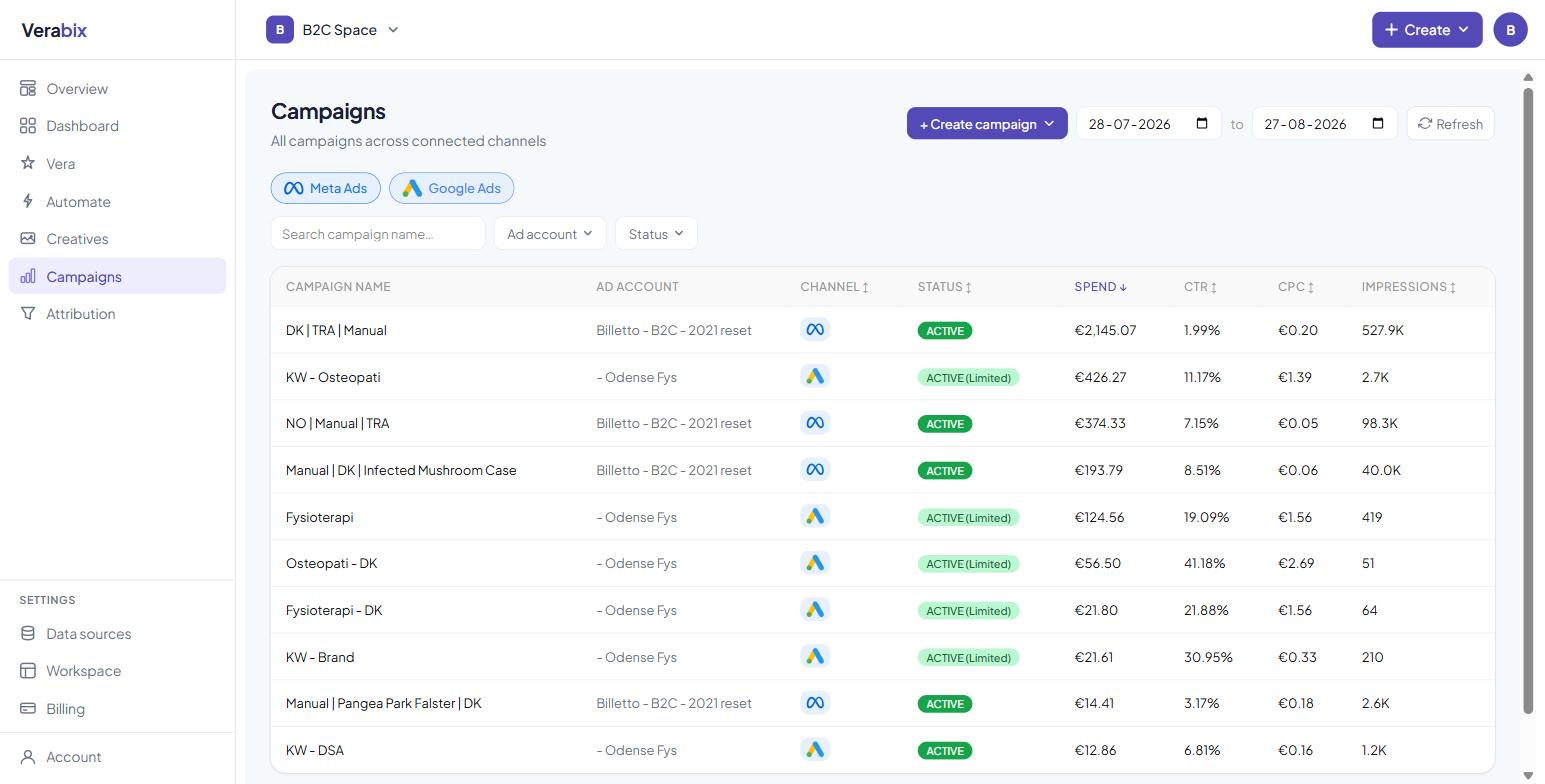
in one table.
Instant campaigns, wizard campaigns and sheet campaigns all land in the same table. Filter, sort, edit budgets and pause — across Meta and Google Ads, without switching tabs.
- All creation methods in one view
- Meta Ads and Google Ads side by side
- Edit budgets and status without leaving Verabix
Straight answers.
How does Vera generate the campaign from a URL?
Vera reads your landing page — headline, body copy, images and page structure — and uses that to pre-fill the campaign name, headline, primary text, goal and creatives. You review everything before it goes live.
Can I edit the campaign after Vera builds it?
Yes. The instant campaign creates a draft you review before launching. Change any field — headline, budget, audience, platforms — before you hit launch.
What does the advanced wizard let me control?
Platform (Meta, Google or both), objective, bid strategy, conversion event, audience (location, age, gender, placements), budget type and amount, schedule, and creative (headline, primary text, media).
How does the Google Sheet trigger work?
You choose from three trigger types: upload once (runs immediately), scheduled check (every 15–60 minutes), or variable trigger (watches a column — when the value matches, the campaign launches). All three are configurable from the same interface.
Which ad platforms does Campaigns support?
Meta Ads and Google Ads. Instant and advanced wizard support both at once. Sheet campaigns currently support Meta Ads.
Build your first
campaign today.
Paste a URL. Connect Meta Ads or Google Ads. Launch in two minutes.