Any dashboard.
One prompt away.
Describe what you want to see. Vera builds the dashboard from your live Meta Ads, Google Ads and GA4 data. Edit it in plain English. Share with one link.
Five tools and a week.
For one dashboard.
Pull data out of Meta Ads and Google Ads
Pay for a third-party connector to sync it
Map fields and fix mismatched metrics
Drag charts around in Power BI, Looker Studio or Tableau
Fix it every time an API or a campaign name changes
Meta Ads and Google Ads, once. Five minutes.
“Weekly ROAS, spend and CPA for Meta and Google.”
Vera builds it on live data. Change it by asking.
Refine any dashboard
in plain English.
No drag-and-drop. No settings panel. Tell Vera what you want to add, remove or change — she does it instantly.
- Add or remove channels, campaigns and metrics
- Switch date ranges, filters and breakdowns mid-conversation
- Ask for the chart type you prefer
“Add CPA next to ROAS.”
+ KPI · CPA · All channels“Only show Spring Sale and Black Friday campaigns.”
Filter applied · 2 campaigns“Switch the ROAS widget to Google only.”
ROAS · Google Ads updated“Give me a breakdown by day for the last 30 days.”
+ Line chart · Daily ROAS · 30 daysOne link.
Always live.
Publish any dashboard to a public link — no Verabix account needed to view it. Put it on the office screen, pin it in Slack, send it to a client.
- No login needed to view
- Data refreshes automatically
- Revoke access any time
Every widget type,
out of the box.
Add any widget by asking Vera — or combine them into templates for your whole team.
KPI card
Single metric with delta. Tracks spend, ROAS, CPA, conversions or any custom metric.
Line chart
Trend over time — daily, weekly or monthly. Works across any channel or combined.
Bar chart
Compare campaigns, ad sets or channels side by side. Group or stack bars.
Table
Ranked list with as many columns as you need. Sortable, filterable, exportable.
Everything you check every morning.
In one place.
Your default dashboard: spend, ROAS, CPA and top campaigns — across Meta and Google Ads, side by side, with GA4 conversion data alongside.
See your overview →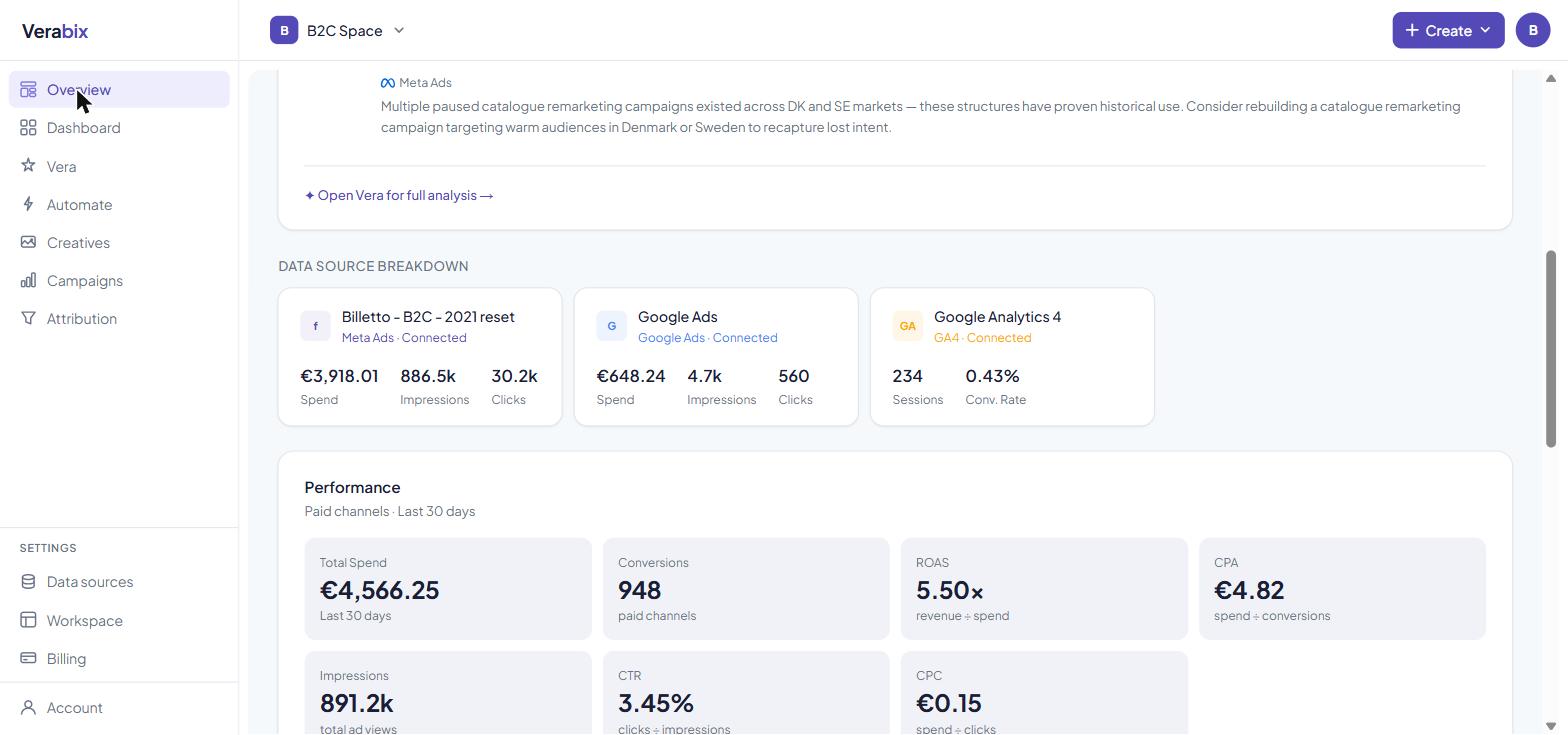
Straight answers.
Does the dashboard update automatically?
Yes. Verabix pulls fresh data from Meta, Google Ads and GA4 on a daily basis — your dashboard shows yesterday's numbers by default, and you can drill into any date range manually.
Can I share a dashboard with someone who doesn't have Verabix?
Yes. Every published dashboard gets a public link that anyone can view — no account or login needed. You can revoke the link at any time from your workspace.
How is this different from Supermetrics or Funnel.io?
Supermetrics and Funnel move data into Google Sheets or a BI tool — you still build the dashboard yourself. Verabix builds it for you from a prompt, keeps it updated and lets Vera answer questions about it in plain English.
Can I build custom dashboards, or only the default one?
Every dashboard in Verabix is built from a prompt — including the default overview. You can build as many custom dashboards as you want and edit any of them at any time.
Does it replace Power BI or Google Looker Studio?
For marketing performance data from Meta and Google Ads, yes — and it's faster to set up and update. If you need to connect dozens of other data sources or build complex cross-department reports, Power BI or Looker Studio are still the right tools.
Build your first
dashboard today.
Connect Meta Ads, Google Ads and GA4. Type what you want to see.